Microsoft 365, SharePoint & Power Platform Solutions in Dubai
Whiz Solutions helps UAE and Middle East organizations get the full value of Microsoft 365, from email and Teams collaboration to SharePoint intranets, Power Automate workflows, and secure document management. We deploy, migrate, and configure the Microsoft cloud so your people can work together securely from any device, anywhere. We work by leveraging technologies from leading platforms and a network of certified technology partners.
We plan and execute Microsoft 365 rollouts and migrations from hosted or on-premises Exchange, moving mailboxes, files, and users with minimal disruption. Your team lands on a properly licensed, correctly configured tenant with security baselines applied from the start.
SharePoint Online Intranet Portals
We design and build SharePoint Online intranets that give staff a single, branded home for news, policies, documents, and team sites. Structured navigation, permissions, and search replace scattered network drives and email attachments with an organized digital workplace.
Microsoft Teams Integration
We configure Microsoft Teams as the hub for communication, meetings, and file collaboration, connected to SharePoint document libraries and approval workflows. Teams becomes the place work happens rather than another disconnected chat tool.
Power Automate Workflows
We automate repetitive business processes such as approvals, notifications, data routing, and reminders using Power Automate across your Microsoft 365 environment. Manual follow-ups and email chains become structured flows that run reliably and log every step.
Power Apps Business Applications
We build low-code Power Apps for requests, inspections, registers, and data capture that plug straight into SharePoint and Microsoft Lists. Staff get purpose-built, mobile-friendly apps without the cost of full custom development where the Power Platform fits.
Cloud Migration & Modernization
We migrate email, files, and collaboration from legacy servers and hosted Exchange into the Microsoft cloud, retiring aging infrastructure. Users keep working while we move data securely and cut over with a tested plan.
Document Management on SharePoint
We turn SharePoint into a controlled document repository with metadata, version history, and approval workflows, creating a foundation for structured, searchable, audit-ready records. For regulated and quality-driven environments, this extends into our dedicated document control and compliance solutions.
OneDrive & SharePoint Backup
We protect Microsoft 365 data with backup for SharePoint, OneDrive, and Exchange, so accidental deletion, ransomware, or account loss doesn't mean lost documents. Native retention plus third-party backup gives you a recoverable copy of business-critical content.
How We Work
How we work
01
Assess
We review your current tenant, licensing, mail, and file setup to identify gaps and the fastest path to value.
02
Plan
We produce a migration and configuration plan covering security, permissions, and cutover, agreed with you before we touch production.
03
Deploy & migrate
We roll out, migrate data, and configure Teams, SharePoint, and workflows with testing at each stage.
04
Adopt & support
We train users and provide ongoing Microsoft 365 administration so the platform stays healthy and well governed.
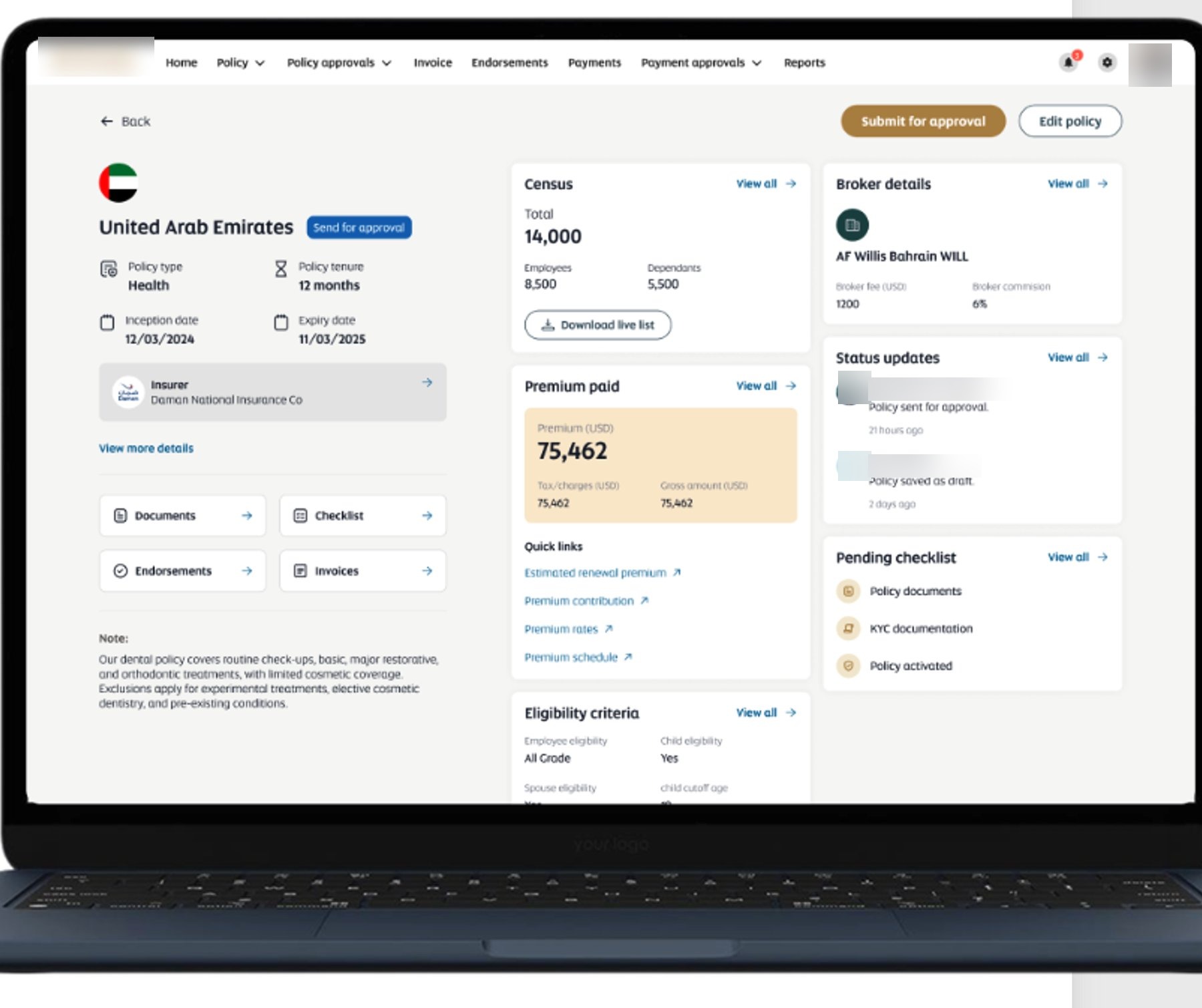
A Microsoft cloud insurance management platform we built for an international airline, spanning 40 countries on SharePoint and the Power Platform.
Purchase approval workflow on Microsoft 365.
We digitized paper-based purchase requisitions for a pharmaceutical distribution company using SharePoint, Power Apps, and Power Automate. Multi-level approvals, mobile sign-off, Teams integration, and notifications replaced paper forms and delivered a complete, audit-ready procurement trail.
SharePoint Online · Power Apps · Power Automate · Microsoft Lists · Microsoft 365
Employee travel request & approval system.
We built a SharePoint-based travel management workflow for the same pharmaceutical distributor, automating requests, cost estimation, document attachments, and multi-level approvals. Email-based approvals became a fully digital, trackable workflow with dashboard reporting.
SharePoint Online · Power Apps · Power Automate · Microsoft 365
We implemented a centralized SharePoint Online document platform for a multi-company construction group, unifying scattered files into a secure, searchable repository with metadata, version history, approval workflows, and role-based permissions across the organization.
SharePoint Online · Power Automate · Power Apps · Azure Active Directory
Medical insurance management platform across 40 countries.
We built a Microsoft cloud-based medical insurance management system for an international airline, streamlining the full insurance lifecycle on SharePoint and the Power Platform, integrated with SAP SuccessFactors. The platform covers policy management, approvals, invoices, endorsements, premium tracking, and multi-country dashboards.
Microsoft SharePoint · Power Apps · Power Automate · Dataverse · SAP SuccessFactors
FAQ
Frequently Asked Questions
Can you migrate us from hosted Exchange to Microsoft 365?
Yes. Migrating from hosted or on-premises Exchange to Microsoft 365 is one of our core services. We move mailboxes, calendars, and contacts on a planned cutover with minimal downtime, and configure security and licensing correctly on the new tenant.
What's the difference between SharePoint and OneDrive?
OneDrive is personal storage for an individual's working files, while SharePoint is shared team and organizational storage with structured libraries, metadata, permissions, and workflows. Most organizations use both, with OneDrive for personal drafts and SharePoint for controlled shared documents. We help you set the boundary correctly.
Do we need Power Apps, or can Power Automate handle our workflow?
Power Automate handles the automation, covering approvals, notifications, and data routing. Power Apps adds a custom screen for people to enter and view data. Simple approvals may need only Automate, while anything requiring a tailored form usually uses both. We recommend the right mix for your process.
Is Microsoft 365 data backed up automatically?
Microsoft provides retention and recycle-bin recovery, but not a full independent backup against long-term deletion or ransomware. We recommend adding dedicated backup for SharePoint, OneDrive, and Exchange so you always have a recoverable copy. We can set this up as part of the deployment.
Can you build our company intranet on SharePoint?
Yes. We design and build SharePoint Online intranet portals with branded pages, news, policy libraries, team sites, and search, giving staff one organized home instead of scattered drives and email. We handle structure, permissions, and rollout.
Modernizing your workplace on Microsoft 365 or SharePoint? Book a free consultation with our Dubai team.
Since 2012 we've built and supported real systems for organizations across the Middle East and the United States. Let's scope yours.