Whiz Solutions
Projects & Case Studies

Projects That Replaced Manual Work With Reliable Systems

A selection of the 80+ projects we've delivered since 2012 — real platforms, built for real operations, across pharma, construction, automotive, logistics, and more. Client names are kept confidential; the work speaks for itself.

CASE 01Automotive

Automotive Sales Automation Platform with OCR

Built an end-to-end sales automation platform for a global automotive brand's marketing partner, replacing a manual, Excel-based process used by field traders to register vehicle sales across multiple dealerships. Field teams capture customer and vehicle data on a Flutter mobile app, while OCR automatically extracts registration certificate details and validates VINs before submission. Dealer and management portals provide live visibility into sales, dealer performance, and vehicle ageing — replacing emailed spreadsheets with a modern digital ecosystem.

Key features

  • Flutter mobile app for field traders (Android & iOS)
  • OCR-powered registration certificate capture and data extraction
  • VIN validation and duplicate detection
  • Dealer approval workflow and role-based portals
  • Real-time management dashboards and exception reports
  • English & Arabic support, cloud-hosted architecture

Screens

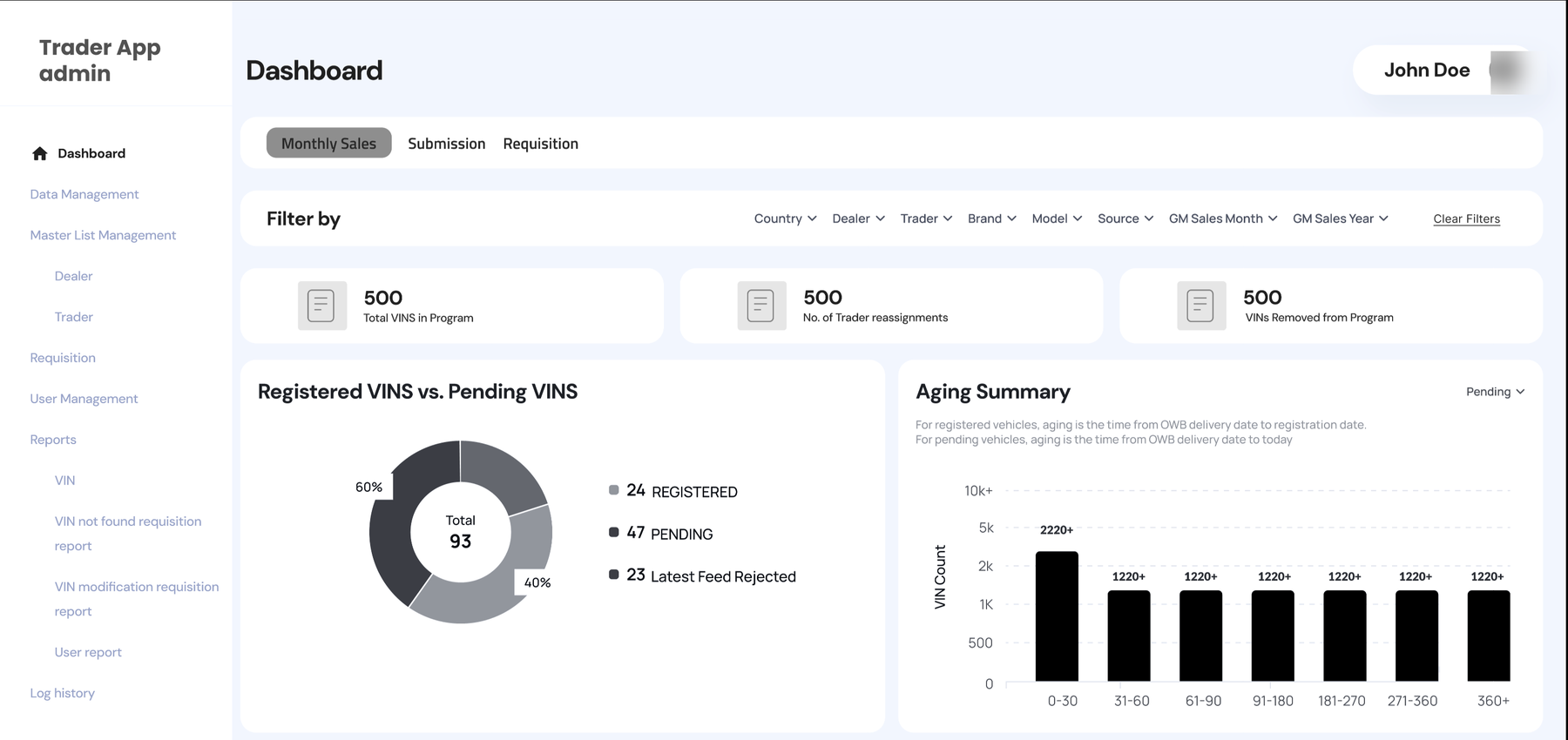
Trader App admin dashboard with monthly-sales filters, VINs-in-program and trader-reassignment counters, a registered-vs-pending VINs donut, and an ageing summary by day band
Performance and submission-timeline charts broken down by dealer and by trader, showing pending vs registered VINs and time-to-registration bands
Registered VINs analysed by source, customer type, and opt-in/opt-out status, with a requests-by-type breakdown of missing VINs and modification requests
Requests-by-trader chart comparing VIN-missing and customer-modification requests across traders
FlutterLaravelMySQLAzure OCRAWSFirebaseNginx
CASE 02Construction

Construction Productivity Monitoring System

Developed a cloud-based productivity monitoring platform for a leading Dubai construction group to capture daily site progress from mobile devices and compare actual output against project estimates. Supervisors log labour, equipment, and completed quantities in the field, with BOQ integration and progress photos. Management gains live variance reporting across every project, replacing delayed manual reports with data-driven control.

Key features

  • Daily work logging from mobile devices
  • Labour productivity and equipment utilization tracking
  • BOQ integration and activity / sub-activity monitoring
  • Planned-vs-actual variance reporting
  • Progress photo uploads and supervisor approvals
  • Multi-project dashboards and analytics
02
Construction Productivity Monitoring SystemConstruction
Live product preview
sitepulse.whizsolutions.app / dashboardLive
SP
Al Qusais Site 3
05 Jul 2026 · Shift A
Manpower on site
0
0 vs plan
Equipment active
38
6 idle · 2 fault
Progress vs plan
0.0%
100.0% behind
Hours logged
0
today · 41 crews

Daily Progress — Structures

14 activities
ActivityUnitPlanActualVar.
Rebar fixing — L4 slabt42.044.8+6.7%
Formwork — C-grid610548−10.2%
Concrete pour — core1801800.0%
Blockwork — Zone D320356+11.3%
MEP first-fix — L3pt240198−17.5%

Output — 7 days

m³/day
Sa
Su
Mo
Tu
We
Th
Productivity index1.04
Idle equipment costAED 4,210
7:484G
Daily LogDraft
Rebar fixing — L4 slab
44.8
t

Syncs when back online · GPS 25.28°N, 55.37°E

App screens — click to enlarge

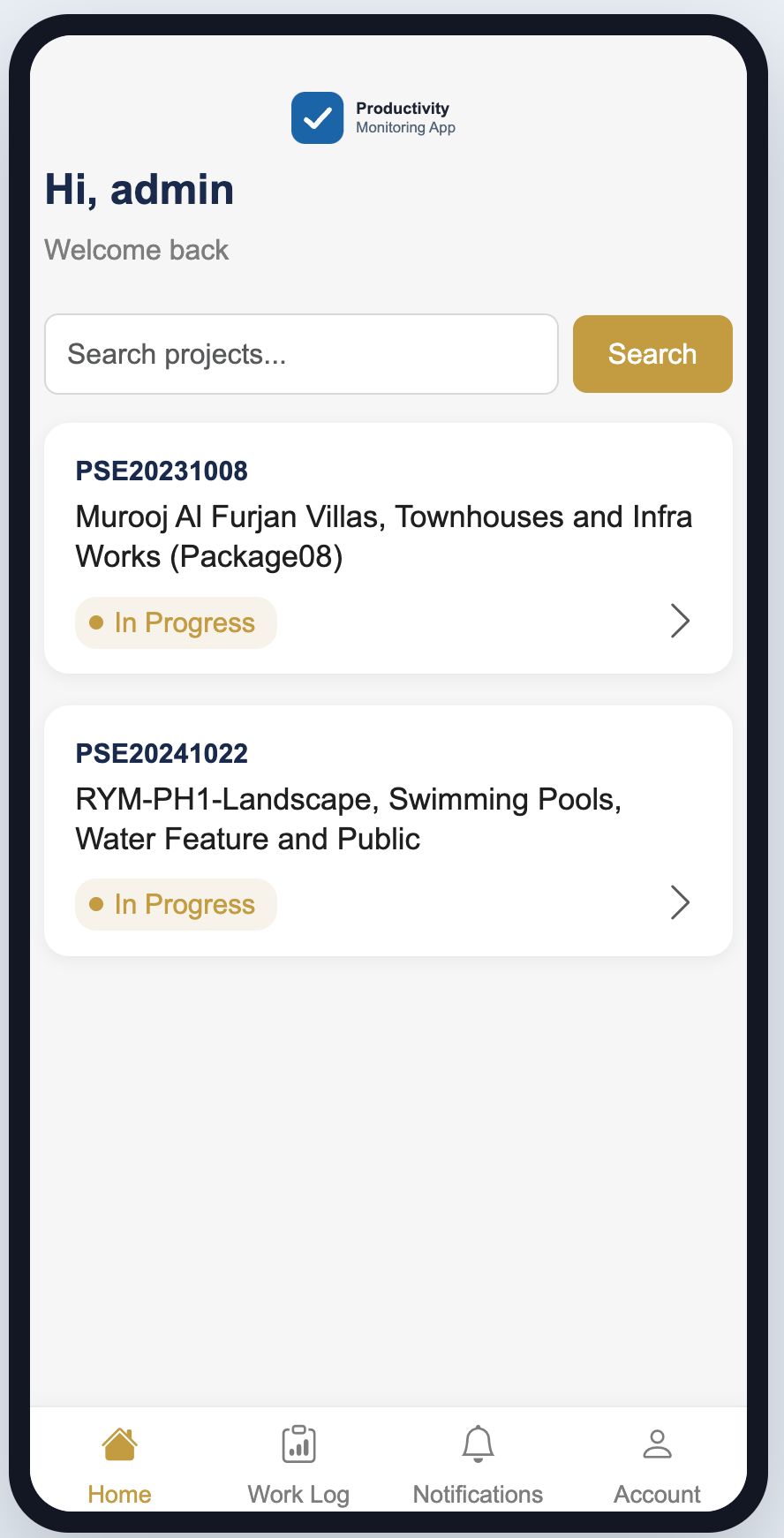
Productivity Monitoring App home screen with a "Hi, admin" welcome, a project search bar, and in-progress project cards listed by reference code (villas, townhouses, landscape and pools packages)Activity detail screen for a hard-landscaping work item, listing its sub-activities (subbase, bulk excavation, disposal) with total, achieved quantities and percentage complete for eachSub-activity screen with tabs to add labours, add assets and review-and-start, showing assigned labour records (names redacted) and assigned machinery, with a Start Sub Activity buttonAdd Machinery to Sub Activity screen with a search box and a checklist of equipment by asset code and type (backhoe loaders, electronics) to assign to the work itemWork Log screen with Ongoing, Completed and Not Started tabs, showing an in-progress sub-activity card with its description, log reference, and start timestamp
ASP.NET CoreRazor PagesSQL ServerREST APIPower BIBootstrap
CASE 03Transportation & Logistics

Internal Vehicle Booking & Fleet Management System

Designed and developed a centralized internal vehicle booking and dispatch platform for a UAE transport services company, replacing the manual phone calls, WhatsApp messages, and spreadsheets used to allocate vehicles and drivers. The system gives employees, coordinators, and administrators a single platform to raise booking requests, assign drivers and vehicles, coordinate trips, and monitor operations — cutting double bookings and administrative workload.

Key features

  • Online vehicle booking and driver allocation
  • Vehicle availability calendar and booking approval workflow
  • Manual dispatch and trip scheduling
  • Driver and vehicle management with document tracking
  • Mobile driver trip controls (map, start/cancel trip, SOS, chat, navigate)
  • Utilization reports and dashboard analytics
03
Internal Vehicle Booking & Fleet Management SystemTransportation & Logistics
Live product preview
fleetdesk.whizsolutions.app / dispatchLive
Trips today
47
Vehicles active
23 / 31
Avg assignment
4m 12s

Booking requests

6 pending
ProjectVehicleRouteTimeStatus
Al Qusais S36-ton flatbedJebel Ali → Site08:30Pending
Marina TwrPickup 4×4Yard 2 → Marina09:00Assigned
DIP Phase 2Water tankerDIP → Site 709:15En route
JAFZA Whse14-ton craneDepot → JAFZA10:00Pending
Sharjah IndLowbed 40tSite → Sharjah11:45Assigned

Assign vehicle

REQ-4471
RM
Rajesh M.
DRV-118 · UAE HGV
Available
Trips today 6
On duty 4h 20m
6-ton flatbedDXB-B 44218
Fuel78%
Next service1,240 km

Driver notified · ETA to pickup 14 min

8:164G
FDTrip · REQ-4471Assigned
ETA 12 min
Pickup
Jebel Ali Yard, Gate 3
Drop
Al Qusais Site 3
Dist 38.4 kmETA 12 min

Screens

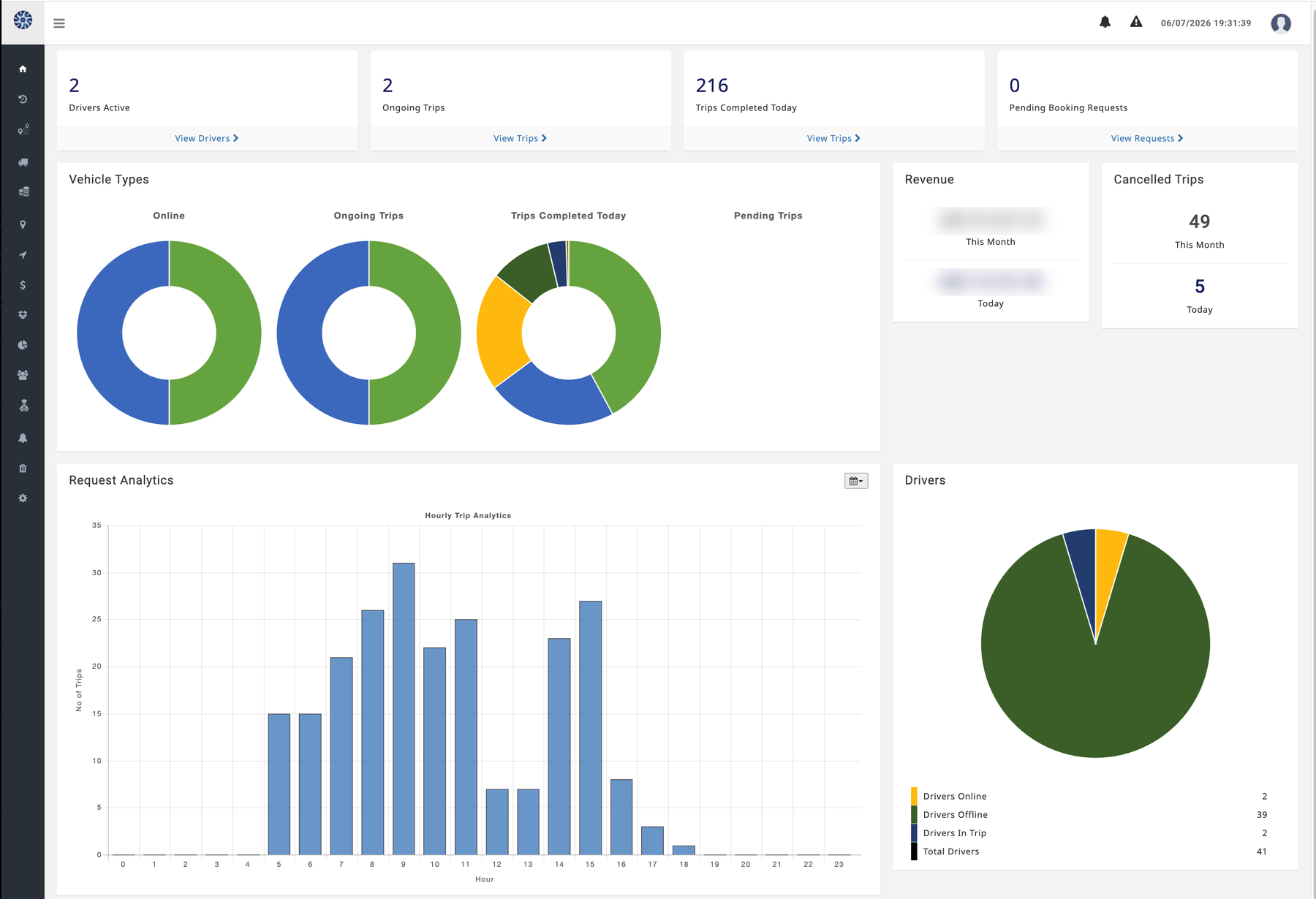
Fleet operations dashboard with active-drivers, ongoing-trips, and trips-completed counters, vehicle-type donuts, an hourly trip-analytics bar chart, a driver online/offline pie, and a revenue summary card
Admin Truck Bookings table listing reference numbers, booking type, project, vehicle type, dates, trip start/end times, total trip time, rating, and trip status across group-company projects
Admin Biker Bookings table with the fleet-management side navigation expanded, showing reference numbers, projects such as Tanseeq, Metaline and Ventana, trip times, and delivery status for each booking
ASP.NET Core / Yii 2SQL ServerBootstrapjQueryIISPower BI-ready
CASE 04Transportation & Logistics

Truck-On-Demand Booking Platform (Enhancement & Support)

Provided ongoing application enhancement and support for a UAE truck-on-demand booking platform that lets businesses and customers move goods without owning or leasing a fleet. The product enables users to set pickup and drop locations, book instant or scheduled trips, choose the right truck type, add cargo details, complete payment, and track trips in real time. Our team contributed to the reliability and continued evolution of the mobile apps and portal, coordinating across backend development, mobile workflows, QA, and design.

Public coverage reported strong first-year adoption for this platform while it continued to receive application enhancement and support. (Whiz Solutions provided enhancement and support, not the original ground-up build.)

Key features

  • Customer-facing booking flow (instant and future trips)
  • Pickup/drop selection and truck-type choice by cargo need
  • Goods and cargo detail capture
  • Pricing, payment, and real-time trip tracking
  • Driver and backend operations workflows
  • Ongoing feature enhancement and maintenance

Screens

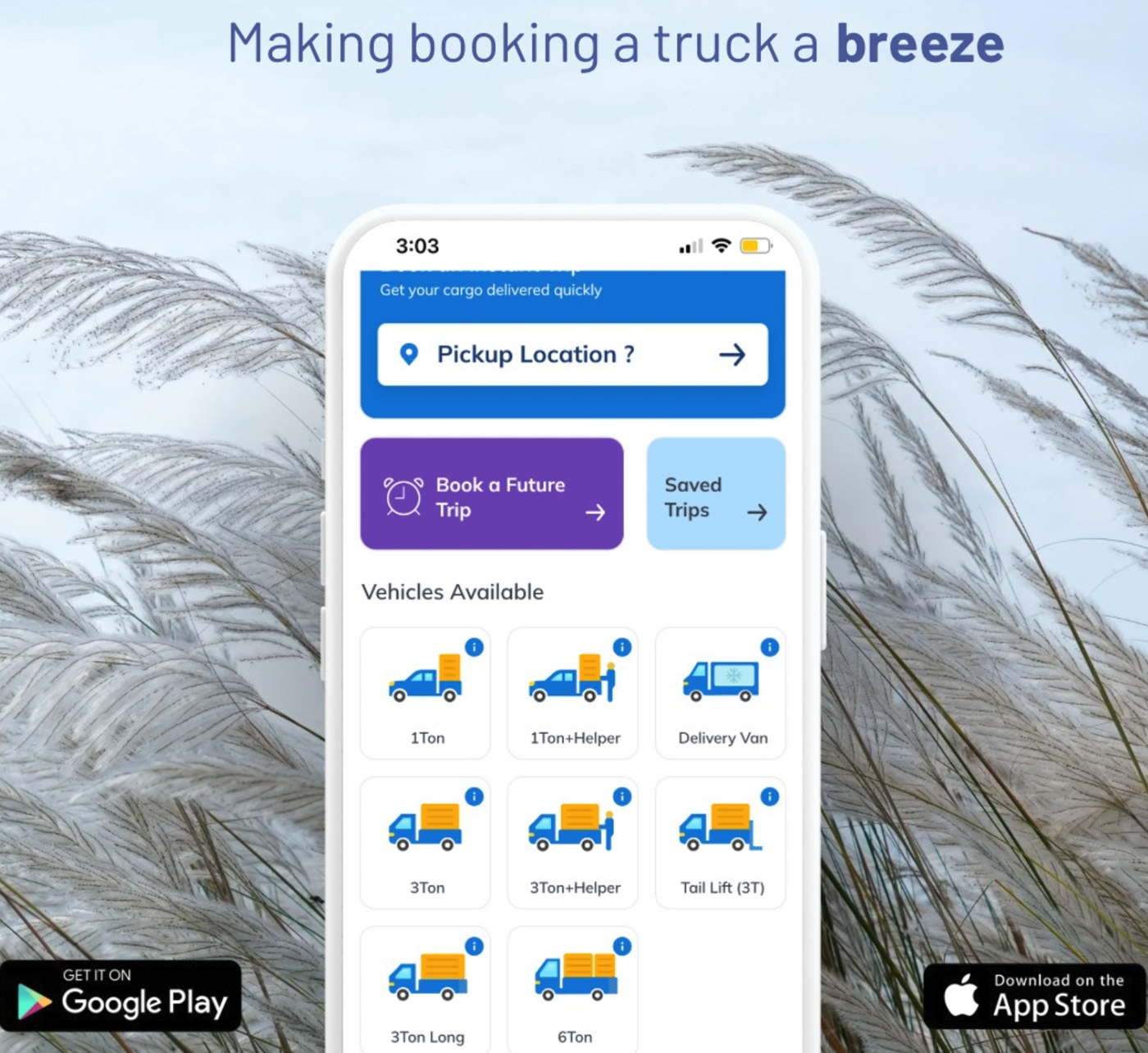
SHAHN "Making booking a truck a breeze" campaign visual showing the app booking home with pickup location, instant and future trip options, and available truck types (1Ton, 1Ton+Helper, Delivery Van, 3Ton, 6Ton) — available on Google Play and the App Store
SHAHN booking home screen shown on a phone in hand — pickup location, book a future trip, saved trips, and the available truck types with bottom navigation
SHAHN — Truck on Demand listing on the Google Play store showing the 4.6-star rating, app screenshots, and Tanseeq Technologies FZCO as the publisher
PHPFlutterVue.jsREST APIsReal-Time Tracking
CASE 05Construction

Enterprise SharePoint Document Management System

Implemented a centralized Microsoft SharePoint Online Document Management System for a multi-company construction group, unifying documents scattered across locations into a secure, searchable repository. The solution added structured libraries, metadata classification, version history, automated approval workflows, role-based permissions, and audit logs — improving compliance, retrieval speed, and collaboration across the organization.

Key features

  • Central document repository with structured libraries
  • Metadata-based classification and advanced search
  • Version history and change tracking
  • Automated document approval workflows
  • Role-based permission management and audit logs
  • Mobile accessibility and Microsoft 365 integration

Screens

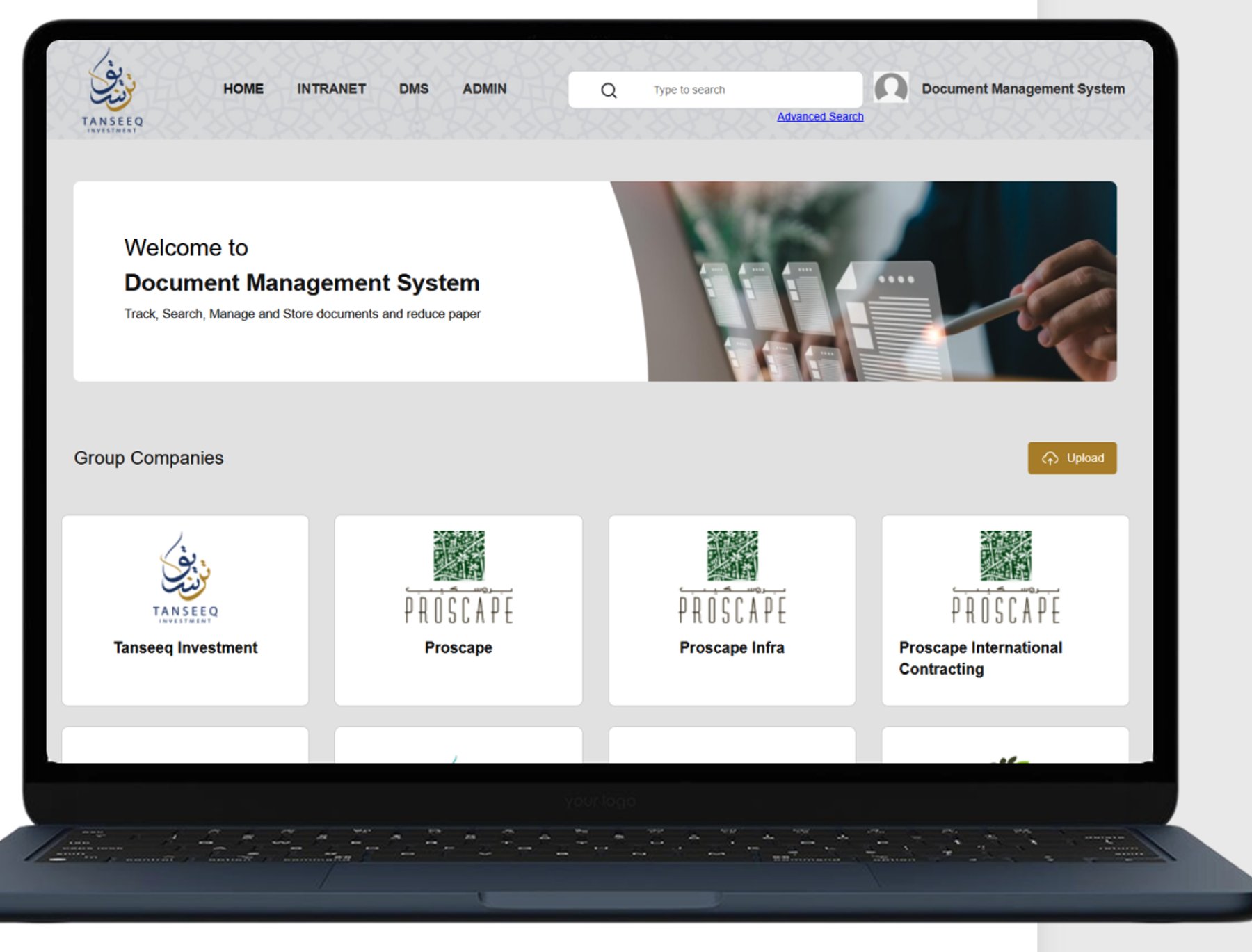
SharePoint Document Management System home showing group-company workspaces on a laptop
Document Management System landing page with group-company libraries
Upload Document form capturing company, category, document type, and metadata
SharePoint OnlinePower AutomatePower AppsMicrosoft 365Azure Active Directory
CASE 06Construction

Workforce Time & Attendance Management System

Built a workforce time management platform for a leading Dubai construction group whose staff — engineers, supervisors, and foremen — move between several project sites in a single day. At each site the worker selects the project and the activity and presses START, then presses STOP when the task is done before moving to the next site, capturing exactly how long was spent where. Time can be logged either through the web portal or the mobile app, with geolocation on each start and stop, so the company can allocate every hour to the correct project. That project-wise time allocation feeds the staff CTC report — turning captured hours into accurate, project-level cost and billing figures — and replaces manual timesheets with real-time, payroll-ready visibility.

Key features

  • Start/stop time capture per project and activity
  • Web portal and mobile app time entry
  • Project-wise time allocation and staff CTC reporting
  • Multi-project, multi-site workforce tracking
  • Geolocation on start/stop and supervisor approvals
  • Payroll-ready reports and dashboard analytics

Screens

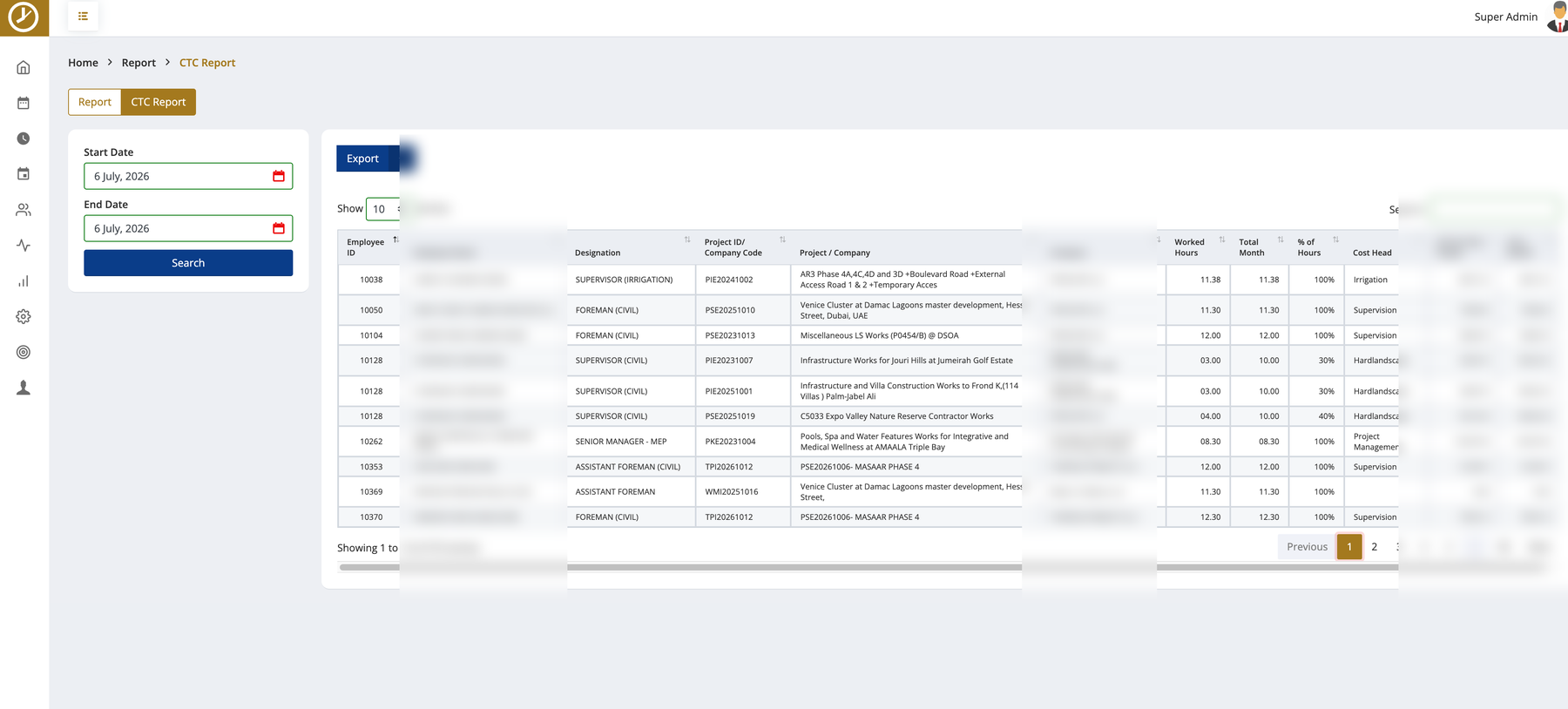
WorkTime CTC report allocating each worker’s hours to the right project — worked hours, percentage of hours, cost head, and project-wise cost per employee (names, companies, and amounts redacted)
Geolocation report showing each worker’s day across multiple sites with start and stop times, start/stop locations, and the activity per site (employee and company names redacted)
Web timesheet entry screen where staff pick a project/company and activity type and enter start and end times before moving to the next site
Project-wise time report listing each entry by project, activity, date, and start/stop time for allocation and billing (employee and company names redacted)
ASP.NET CoreSQL ServerBootstrapREST APIsPower BI
CASE 07Pharmaceutical & Life Sciences

Purchase Order Approval System

Built a digital purchase requisition and approval workflow for a pharmaceutical distribution company using Microsoft 365, replacing paper forms and improving purchasing governance. The system automates requisition submission, multi-level approvals, notifications, and tracking — delivering a faster procurement cycle, full approval visibility, and a complete audit trail for compliance.

Key features

  • Online purchase request submission
  • Multi-level and mobile approvals
  • Email and Microsoft Teams notifications
  • Attachment support and approval history
  • Complete audit trail for compliance
  • Dashboard reporting

Screens

Power Apps purchase requisition form with approval status
Approval workflow and audit history view
SharePoint OnlinePower AppsPower AutomateMicrosoft ListsMicrosoft 365
CASE 08Pharmaceutical & Life Sciences

Travel Request & Approval System

Built a complete web-based travel request and approval application for a pharmaceutical distribution company on the Microsoft Power Platform, not just a form workflow. The system spans multiple screens — structured request entry, role-based dashboards, multi-level approval queues, and full status tracking — with distinct access for requestors, managers, and finance. Requests capture travel details against business rules and validations, route through multi-stage approvals with cost review and re-approval on variance, and are traceable end to end through a complete audit log. Reporting and dashboard views give every role live visibility, replacing manual forms and email approvals with a governed, mobile-friendly application.

Key features

  • Multi-screen web application: request entry, dashboards, approvals, and status tracking
  • Role-based access for requestors, managers, and finance
  • Multi-level approval workflows with validations and cost re-approval on variance
  • Structured data capture with business rules and travel history
  • Reporting and dashboard views for every role
  • Complete audit log and approval notifications

Screens

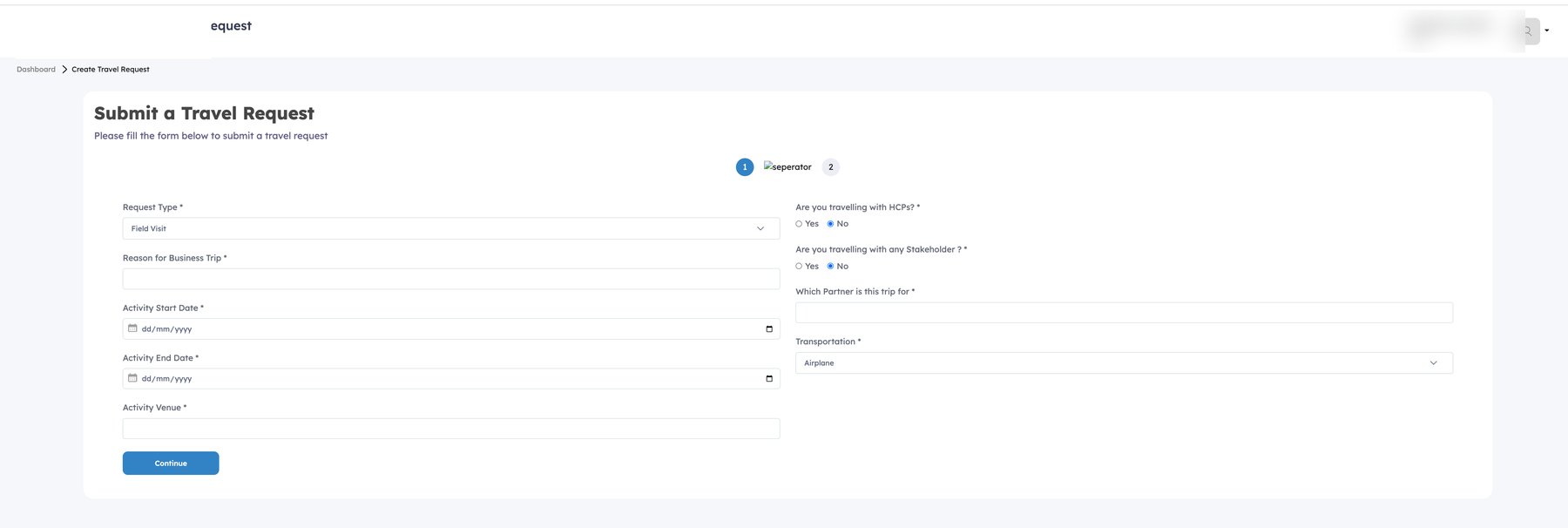
Travel request entry form capturing request type, reason for business trip, activity dates and venue, transportation, and whether the trip involves HCPs, stakeholders, or a partner
Requestor dashboard with active-request, pending-action, approved-this-month, and rejected counters and a recent-requests table showing destinations, dates, status, approver, and version (names redacted)
Manager dashboard with awaiting-approval, approved, rejected, and total-managed counters, a review-now prompt, and the same recent-requests tracking table (names redacted)
Final approval queue showing a role-routed request with a confirmed cost breakdown (flight, hotel, other), employee estimate, variance percentage triggering re-approval, and approve/reject actions (names redacted)
System audit log listing every action across requests by timestamp, request ID, event type, actor role, and comment — submissions, clarifications, approvals, pricing, and re-approvals (names redacted)
SharePoint OnlinePower AppsPower AutomateMicrosoft ListsMicrosoft 365
CASE 09Aviation

Medical Insurance Management System

Built a Microsoft cloud-based medical insurance management platform for an international airline to streamline the full insurance lifecycle across 40 countries. The system consolidates policy management, policy and payment approvals, invoices, endorsements, premium tracking, broker details, census data, eligibility criteria, and pending checklists into one governed environment, with an integration to SAP SuccessFactors keeping employee and census data aligned. Multi-country dashboards give the insurance team a live view of expiring policies, premiums due, and pending claims — replacing scattered spreadsheets and email approvals with a controlled, auditable process at global scale.

Key features

  • End-to-end policy management with approvals for policies and payments
  • Invoices, endorsements, and premium tracking in one place
  • Broker details, census data, eligibility criteria, and pending checklists
  • Multi-country dashboards for expiring policies, premiums due, and pending claims
  • SAP SuccessFactors integration for census and employee data
  • Coverage across 40 countries on Microsoft SharePoint and the Power Platform

Screens

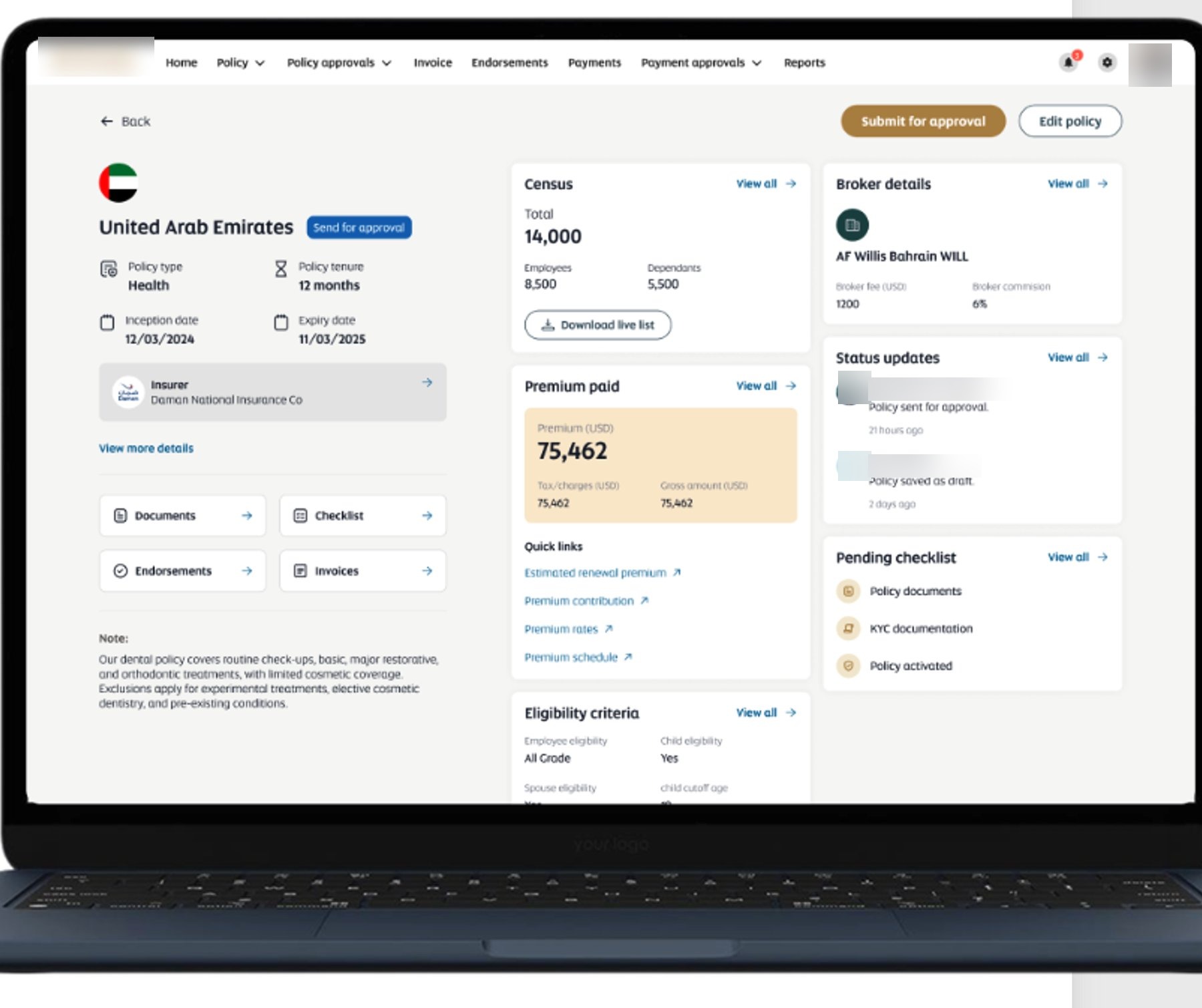
Medical insurance management portal policy detail view shown on a laptop
Insurance portal home dashboard with expiring policies, premiums due, and pending claims
Add new policy form capturing policy, station, insurer, and broker details
Microsoft SharePointPower AppsPower AutomateDataverseSAP SuccessFactors Integration
CASE 10Healthcare & Retail Pharmacy

Executive Power BI Pharmacy Dashboards

Built interactive Power BI dashboards for a regional pharmacy retail chain, consolidating sales, inventory, purchasing, and branch data from multiple systems into a single executive reporting platform. Management gained real-time KPI visibility and drill-down analytics — sales performance, inventory movement, purchase trends, branch and supplier performance — in place of slow, manual Excel reports.

Key features

  • Sales performance and product analysis dashboards
  • Inventory movement and purchase trend analytics
  • Customer, branch, and supplier performance views
  • Executive KPI dashboard with drill-down
  • Data consolidation from multiple systems

Screens

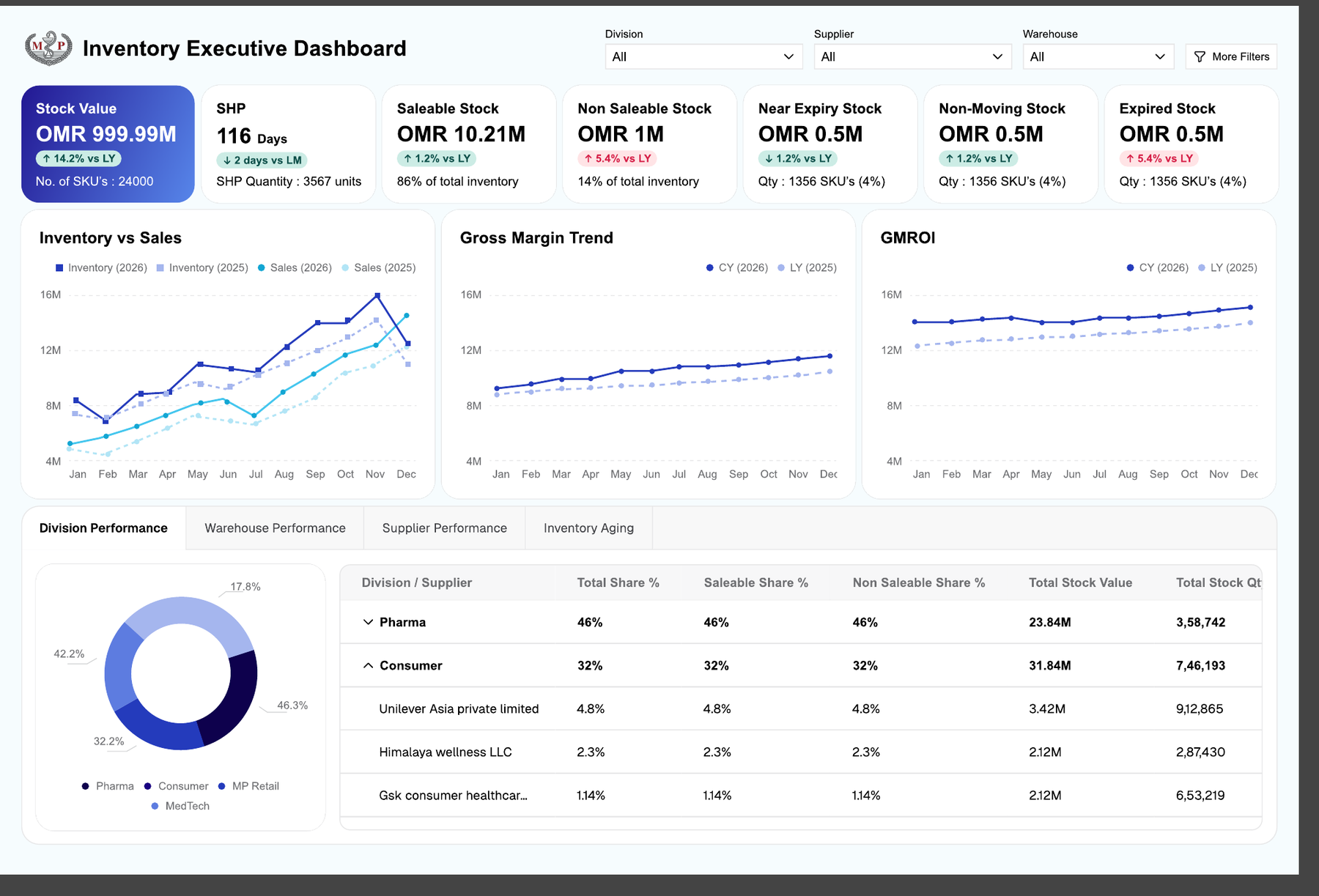
Inventory executive dashboard in Power BI with stock value, saleable and expiry KPIs, trends, and division performance
Warehouse performance view with stock turnover, saleable inventory value, and location filters
Inventory aging analysis with expired, non-moving, and moving stock breakdown by product
Microsoft Power BISQL ServerPower QueryDAXExcel Integration
CASE 11Manufacturing

Contract Management System

Developed a contract management system for a leading sanitaryware manufacturer to bring contract creation, approval, and renewal into one controlled workflow. Contracts move through multi-level approvals and are signed digitally with DocuSign, while renewals, addendums, and expiry alerts with automated reminder emails keep every agreement current. Dashboards track signed, pending, rejected, and overdue contracts, and invoices can be uploaded and tied directly to their contracts — replacing manual tracking and missed renewals with clear visibility and accountability.

Key features

  • Contract creation with multi-level approval workflows
  • DocuSign digital signatures for paperless execution
  • Renewals and addendums with expiry alerts and auto-reminder emails
  • Dashboards for signed, pending, rejected, and overdue contracts
  • Invoice upload tied to the relevant contract
  • Central, searchable record of every agreement

Screens

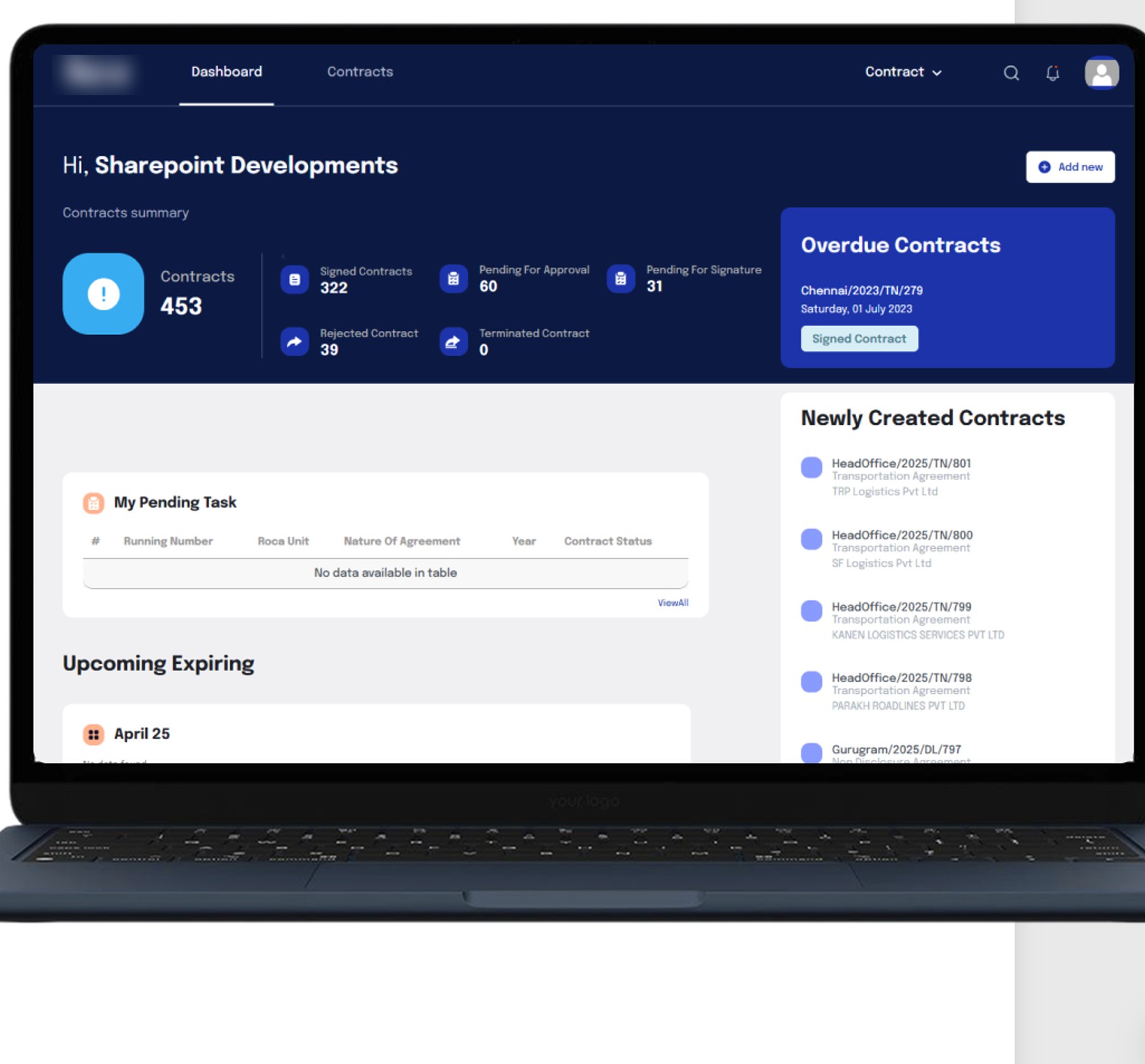
Contract management dashboard with contract summary and overdue contracts on a laptop
Contract dashboard showing signed, pending, rejected, and overdue contract counts
SharePointPower AppsPower AutomateDocuSign
CASE 12Manufacturing

Plant Tour Management System

Built a plant tour management system for a global electrical equipment manufacturer to digitize its plant-tour and Gemba process across the shop floor. Tours are scored against 5S, performance, safety, quality, and EMS criteria, with tour-score dashboards by department and open observations tracked by category and flagged for near-misses. A central database also supports the new-product and change approval processes — replacing paper checklists with structured, trackable data that drives continuous improvement.

Key features

  • Digitized plant-tour / Gemba scoring for 5S, performance, safety, quality, and EMS
  • Tour score dashboards by department
  • Open observations tracking with categories and near-miss flags
  • Central database for new-product and change approval processes
  • Structured data capture replacing paper checklists
  • Continuous-improvement visibility for management

Screens

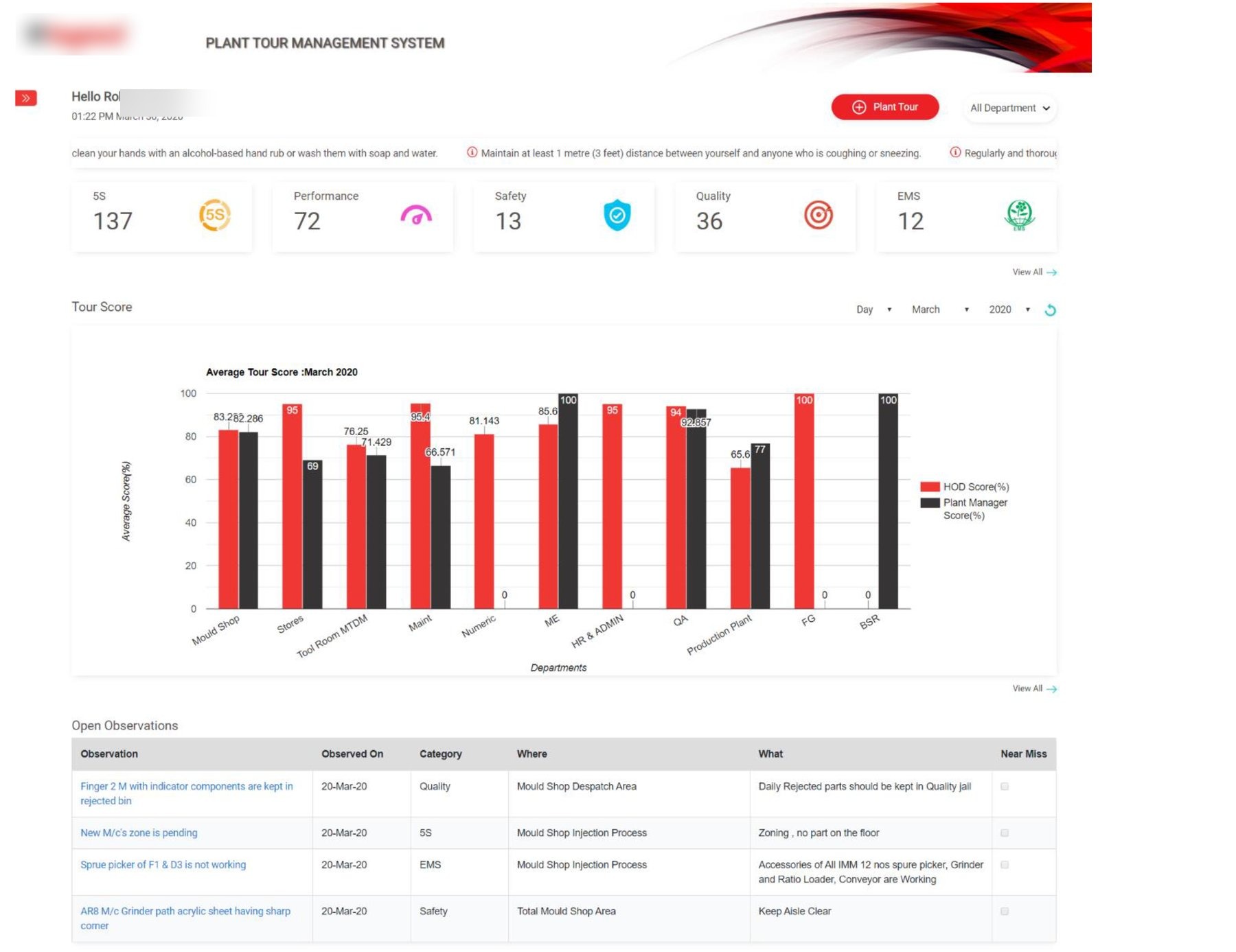
Plant tour management dashboard with 5S, safety, quality, and EMS scores and tour-score chart by department
Web ApplicationDashboardsWorkflow Automation
CASE 13Construction

Group Intranet & Document Management Portal

Delivered a group intranet and document management portal for a leading Dubai construction and landscaping group, giving each group company a single branded home and unifying document handling across the organization. Documents are uploaded by type and automatically classified, with metadata extracted using Microsoft Syntex, role-based access controlling who sees what, and advanced search reaching across every group company. The portal turns scattered files and disconnected company sites into one organized, searchable digital workplace.

Key features

  • Group-company home pages within a single portal
  • Document upload by type with automated classification
  • Metadata extraction with Microsoft Syntex
  • Role-based access across group companies
  • Advanced search spanning the whole group
  • Organized, searchable digital workplace

Screens

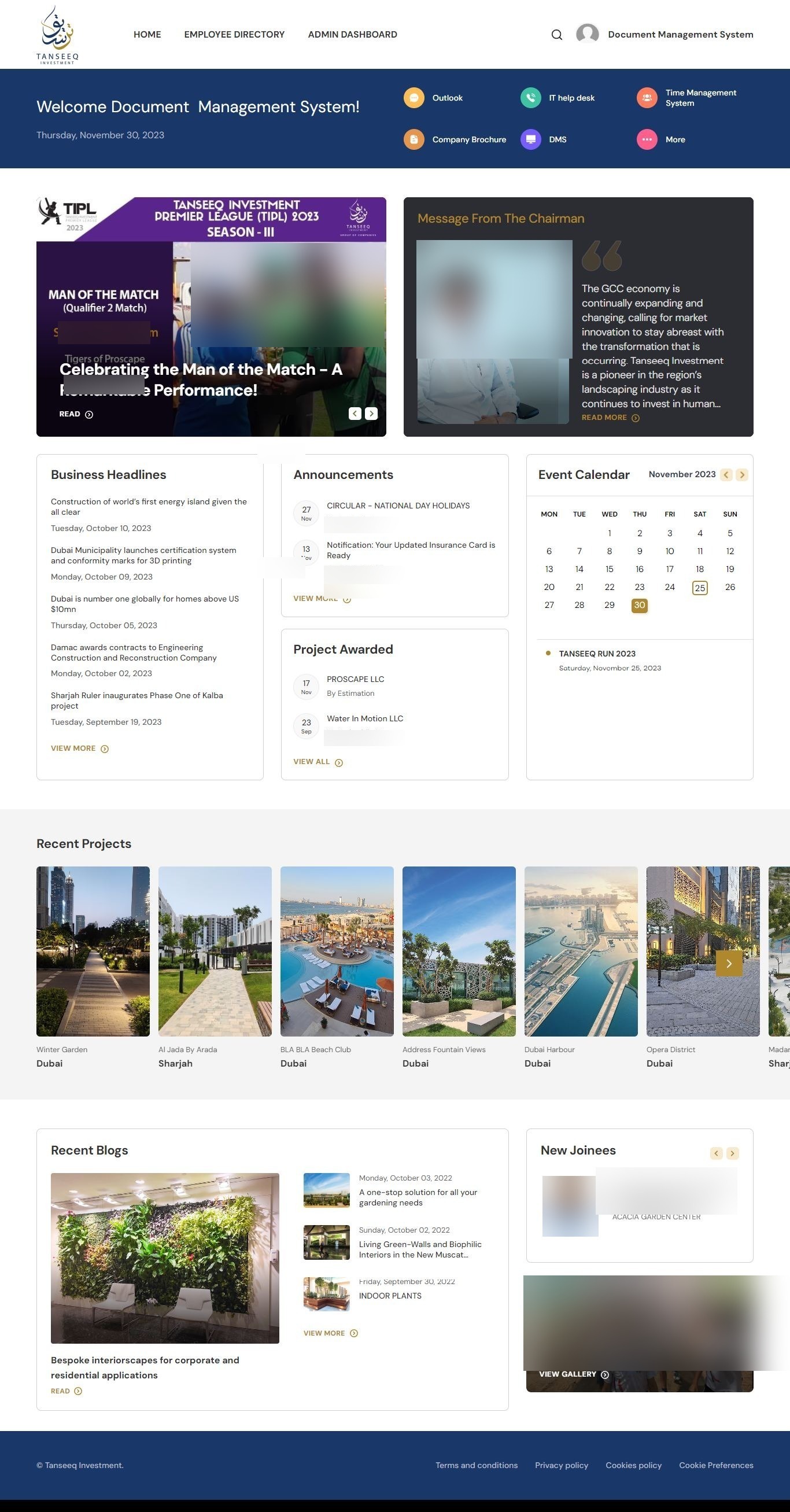
Group intranet home page with announcements, event calendar, recent projects, and company links
SharePointPower PlatformMicrosoft Syntex
CASE 14Cross-industry

Odoo ERP Custom Development

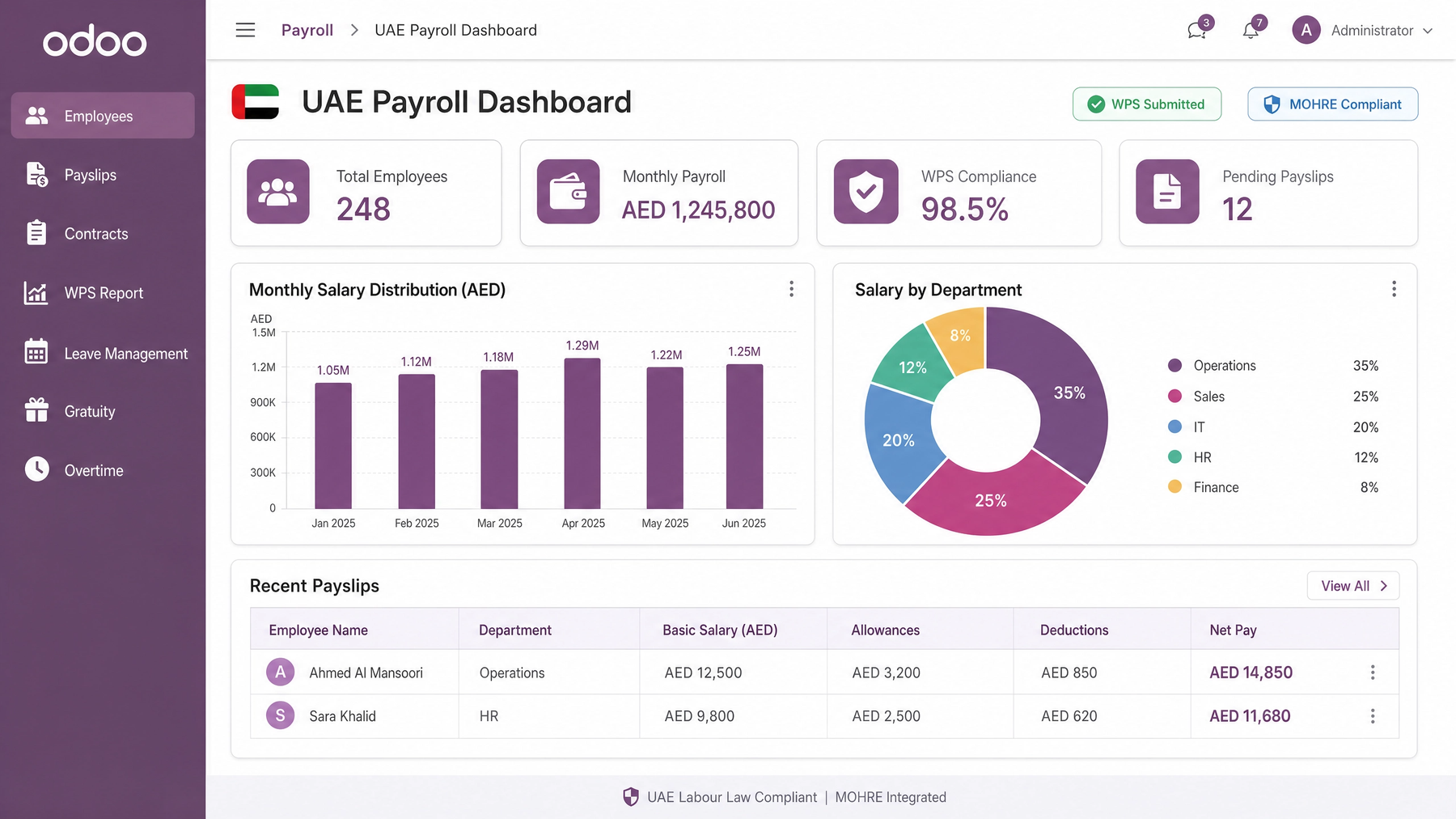
Custom Odoo ERP implementations and module development — spanning finance, inventory, operations, and HR/payroll workflows, plus integrations and reporting tailored to each business. This includes region-specific payroll dashboards such as UAE (WPS / MOHRE) and Saudi Arabia (GOSI / HRSD) modules, so payroll runs stay compliant with local labour law. We extend and configure Odoo to fit how your teams actually work, rather than forcing processes into a rigid template.

Section-only entry for now — detailed case studies to follow.

Screens

Odoo UAE Payroll dashboard with total employees, monthly payroll in AED, WPS compliance rate, pending payslips, monthly salary distribution, and salary-by-department breakdown — marked WPS Submitted and MOHRE Compliant
Odoo Saudi Arabia Payroll dashboard with total employees, monthly payroll in SAR, GOSI compliance rate, pending payslips, salary distribution, and workforce-by-nationality breakdown — marked GOSI Submitted and HRSD Compliant
OdooPythonPostgreSQLUAE & Saudi Payroll Modules
CASE 15Construction

Construction Service Request Platform

Built a service request platform for a construction group to digitize on-site logistics bookings such as crane hire, water delivery, and labour transport. Instead of ad-hoc phone and email requests, site teams submit and track service requests through a single system with approval routing and status visibility — reducing coordination delays and giving management a clear record of every request across projects.

Key features

  • Online service request submission (crane, water delivery, labour transport, and more)
  • Approval routing and status tracking
  • Multi-project and multi-site support
  • Role-based access
  • Request history and reporting
  • Notifications for requesters and approvers

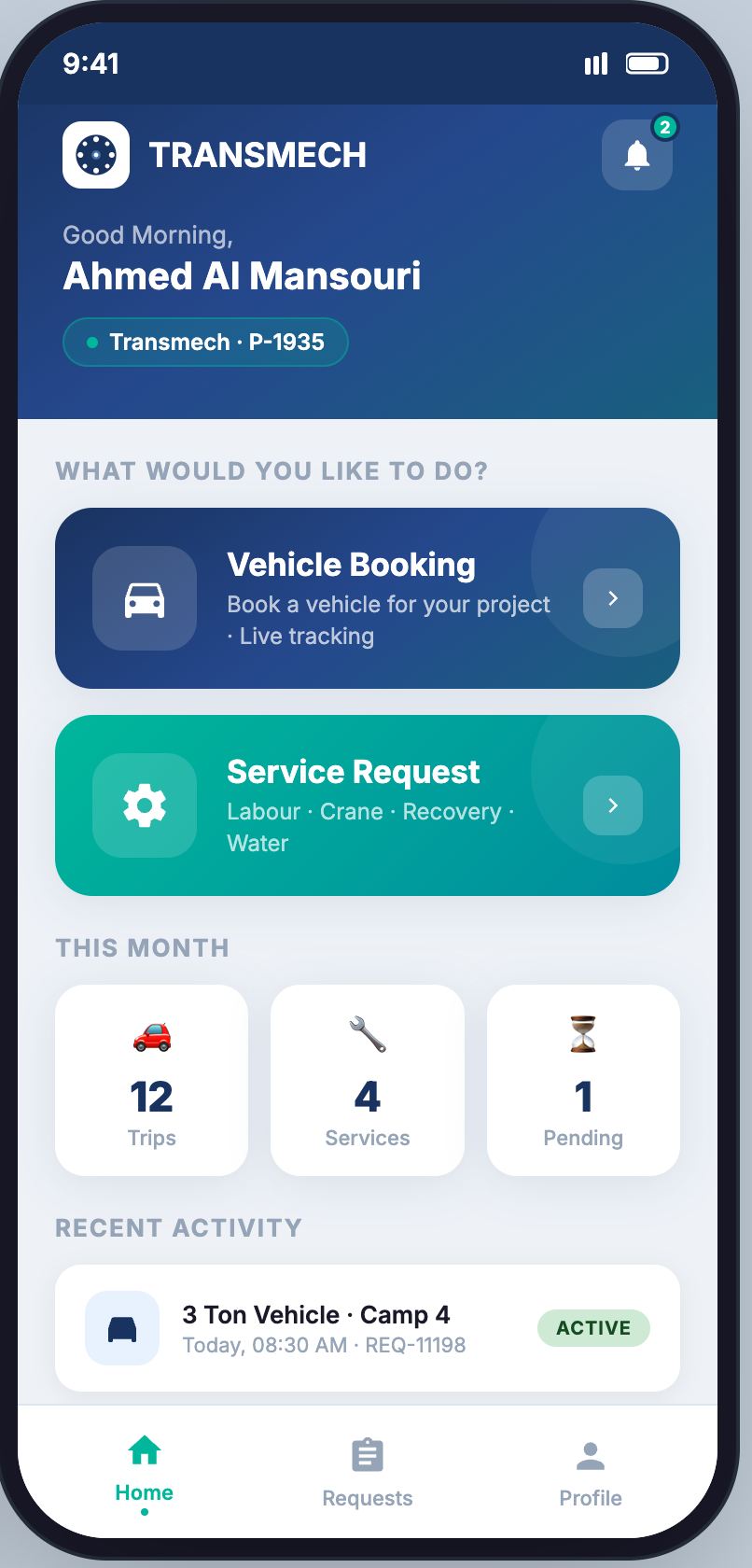
App screens — click to enlarge

Project manager home screen with a "Vehicle Booking" and a "Service Request" (Labour · Crane · Recovery · Water) shortcut, this-month counters for trips, services and pending requests, and a recent-activity cardBook a Service screen listing the on-call request types — Labour & Staff Transport (per trip), Crane Pickup (hourly, work start to stop), Recovery, and TSE / Sweet Water (by actual delivered quantity) — each routed to operations for driver and vehicle assignmentLabour & Staff Transport request form capturing project, pickup and drop-off site (client name redacted), service type, date and time, worker head count with stepper, and optional notes before review and submitRequest Submitted confirmation screen with reference REQ-11198 and a status timeline stepping through Request Submitted, Awaiting Assignment (operations reviewing), Driver Assigned, In Progress, and CompletedMy Requests tracking list filtered by All / Active / Pending / Completed, showing each request by reference and type with status pills — a pending labour transport, an active 3-ton vehicle trip, a completed crane pickup showing 4.5 hrs, and a TSE water delivery showing 12,000 L deliveredLive trip tracking screen with an en-route map, pickup-to-drop route and 12-minute ETA, request reference and In Progress status, the assigned driver (name redacted) and rating, plate number, and vehicle, pickup and drop-off details
ASP.NET CoreSQL ServerBootstrapREST APIPower BI-ready

Have a process that's still stuck on spreadsheets?

These projects started exactly where you might be now. Let's scope what a reliable system could look like for your operation.

Book a Free Consultation